Agent workspace
Multi-turn chat threads where the assistant reads, edits, and runs commands in your on-device session — the same loop as the desktop harness.
Via dsh web sessions, served on loopback
Local agent harness · Android
Pocket Harness runs DeepSeek Harness locally on your Android phone — no root, no hosted backend. Your keys and sessions stay on the device.
Built on DeepSeek Harness 0.2.1-alpha.1 (MIT). Independent product, not affiliated.
Prefer to read code? Browse the public source — default branch in transition, see roadmap.
Scope
Pocket Harness is the full agent workspace, moved onto your phone. Stating the boundaries up front is part of the product.
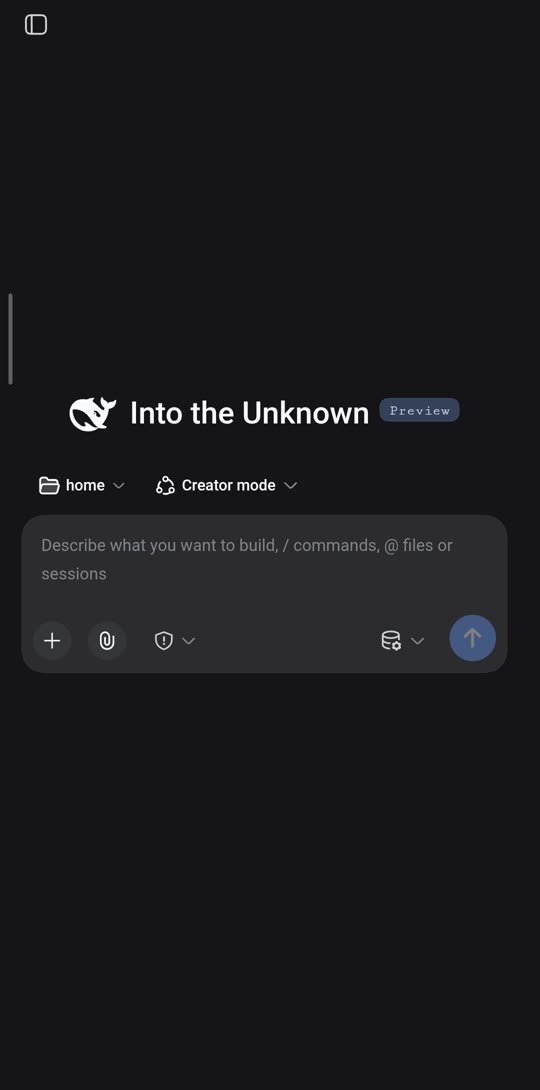
dsh web running on the phone itself.Tour
Three captures from the phone itself at 540×1090: the home composer, the plugin market, and settings. Each names the mechanism behind it — no staged renders.
/ commands, @ files, and sessions route to dsh web on loopback.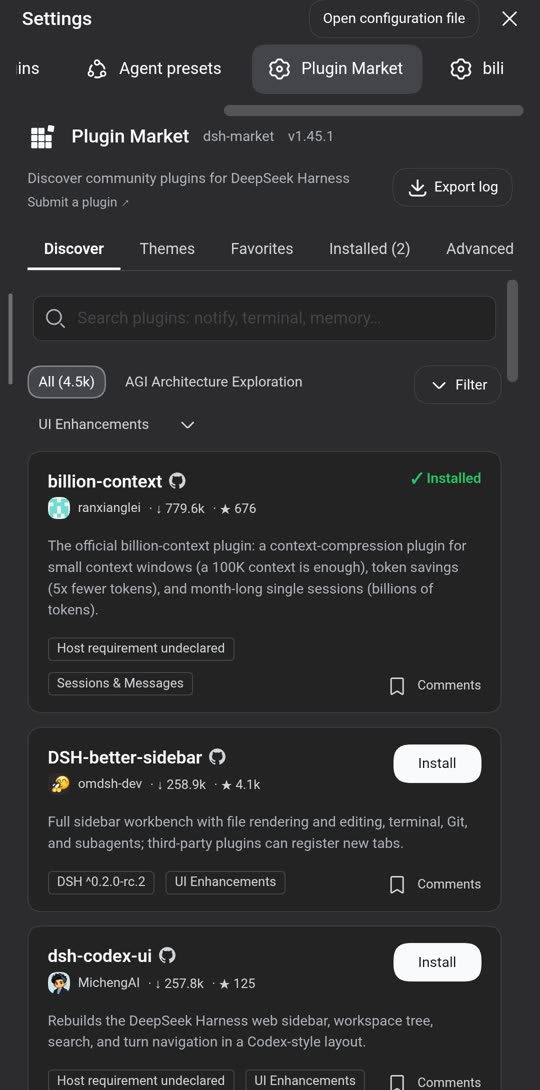
dshmarket plugin.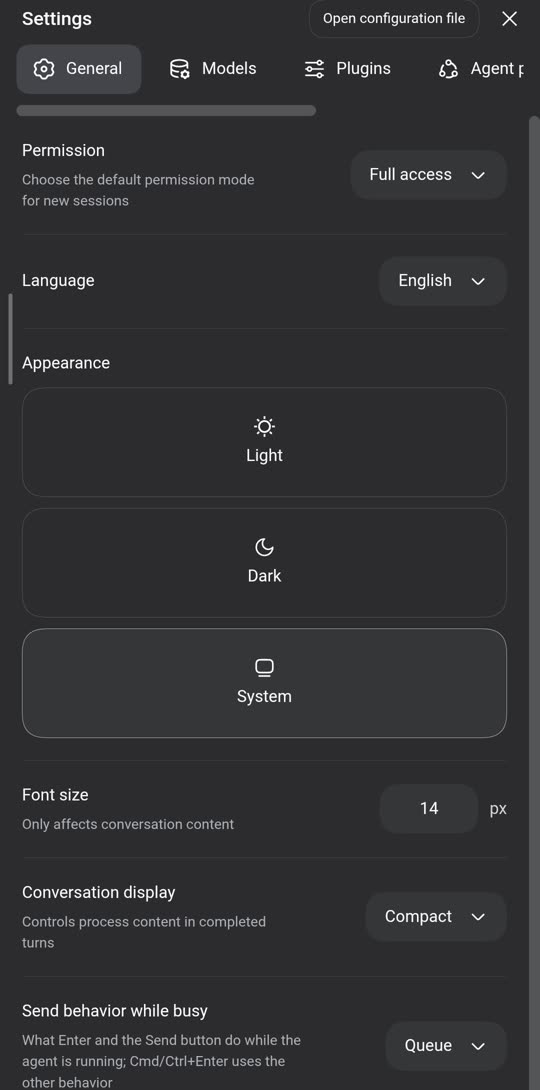
Captures show the on-device web UI served by dsh web; the Pocket Harness mark is the checkmark-circle. Home capture keeps its upstream session title verbatim for honesty.
Runtime
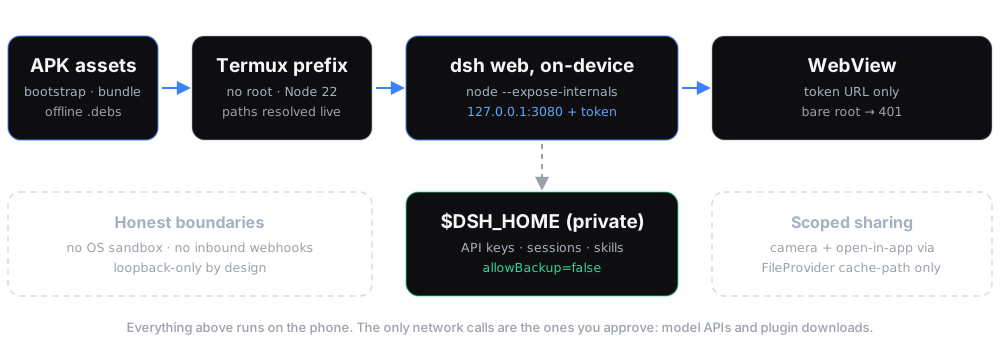
Install the APK, let the first run provision the environment, add your API key. Every path below is resolved live on the device — nothing is hardcoded.
Android 7.0+, no root, no extra downloads. The APK carries the bootstrap and the full server bundle.
Sets up an on-device Linux userland, Node 22, offline packages, and the server bundle from local assets.
dsh web listens on 127.0.0.1:3080 only. The app opens it in a WebView with a one-time token URL.
Enter it at first run or in Settings → Models. It stays in the private on-device home directory.
Capabilities
Six things the app does. Each one names the mechanism underneath — no adjectives without plumbing.
Multi-turn chat threads where the assistant reads, edits, and runs commands in your on-device session — the same loop as the desktop harness.
Via dsh web sessions, served on loopback
Install community plugins, add free-model providers, and generate images or video frames — preseeded so the first run is useful.
Via dshmarket, opencode2dsh, imagegen/videogen
A real shell with a pseudo-terminal and fast file search, so the agent can build, grep, and run tests like on a workstation.
Via NDK-built PTY + ripgrep, offline
Shoot a photo or attach a file straight into a thread. Media is staged through an isolated cache, never your private home.
Via FileProvider cache-path staging
Web and platform search works out of the box — no search-API signup, no key to paste — for research the agent can cite.
Via freesearch plugin, preseeded
Long threads get compacted instead of exploding: the context window is guarded and summarized so work survives the weekend.
Via overflow guard + /compact halving
Trust
A table, not a promise. Every row states what is protected, by what mechanism — including the one row where the answer is “not protected”.
| Local-only server | Enforced Listens on 127.0.0.1:3080. No other host on the network can connect; binding to all interfaces is rejected. |
|---|---|
| Token-gated views | Enforced The WebView opens a one-time ?token=… URL. Opening the bare address returns 401. |
| Keys & sessions | Private Stored in the app-private home ($DSH_HOME). Android backup is disabled (allowBackup=false), so they never leave in a backup. |
| File sharing | Scoped Camera captures and “open in app” go through a cache-only FileProvider. Your private home is never exposed to other apps. |
| Permissions, justified | Internet (model APIs + plugin downloads) · foreground service (keep the server alive) · camera + media (attachments only, on request). |
| OS-level sandboxing | Not possible Container isolation needs privileges a non-root phone can’t grant. The agent runs unsandboxed and the app says so on-screen. Best for personal devices and repos you trust — not for running untrusted code. |
Facts
Exact versions and targets. If a number matters to your review, it’s here — not in a footnote.
| Package | com.dsh.mobile · version 0.1.0 (2) |
|---|---|
| Requires | Android 7.0+ (API 24). No root. |
| SDK targets | minSdk 24 · targetSdk 28 (deliberate: running executables from the app directory, the same approach as Termux) · compileSdk 35 |
| Runtime | Node 22 · on-device server on 127.0.0.1:3080 · WebView UI |
| Built on | DeepSeek Harness 0.2.1-alpha.1, shipped pristine with mobile changes as separate patches + a plugin. |
| Source | github.com/dafazar/pocketharness (public; default branch in transition — see roadmap). |
| Preseeded | Plugin market · free-model providers · keyless web search · image + video skills · one-tap file download. |
| Upstream license | MIT (deepseek-ai/deepseek-harness). Pocket Harness is an independent product built on the open-source project. |
Verification
Four automated gates run before every build. They’re counts of checks, not marketing numbers — each one names what it guards.
Across 27 files: bootstrap, server lifecycle, and the mobile plugin surface.
parity-check.sh: every documented feature verified present on-device.
preflight-check.mjs: environment and integrity checks before packaging.
Upstream stays pristine: all mobile patches must apply cleanly, or the build stops.
Status
Where the project stands today, and what “later” concretely means. Nothing here links to something that doesn’t exist yet.
Answers
The six questions every reviewer asks. Short answers, no hedging.
No. Pocket Harness runs in a normal app sandbox on Android 7.0 and newer. The trade-off is honest: without root there is no OS-level process isolation, so the app runs unsandboxed and tells you so.
Bootstrap is fully offline — the APK carries the userland, Node, and the server bundle. Day to day, only model API calls and plugin downloads need the network; some preseeded providers are free.
Bring your own API key — entered in-app at first run or later in Settings → Models — or start with a preseeded free provider. Keys are stored in the app-private on-device home and never leave except to call the model.
You absolutely can. Pocket Harness is that setup, productized: one APK, offline bootstrap, a token-gated touch UI, preseeded plugins, and 300+ automated gates before each build — instead of an afternoon of shell commands.
Sessions and keys stay on the device; the server binds loopback only and backups are disabled. The known boundary: no OS sandbox, so evaluate it for personal devices and trusted repos — the security table states this plainly.
Email mobileharness@pocketharness.my.id to request a test build. The source is already public at github.com/dafazar/pocketharness (note: default branch in transition — still shows an earlier project; Pocket Harness docs live on a separate branch). Signed APK with checksums follows; see the roadmap.
Early access
Test builds go out by email. Tell us what you’d run on it — we read every request.
Or browse the public source on GitHub — builds still go out by email while the default branch is tidied.